Tag Archives: vocabulary

Teaching Online? An Engaging Little Tool you and your Students are Gonna Love

Are you teaching remotely? You are gonna love this tool!!!!

Guess what. I have the most incredible job in the world. I love teaching. It might seem boring from the outside. Even some people might say it is repetitive; you know, always teaching the same things … but believe me when I tell you that if you are willing and committed to teaching, you can explore ways to make teaching always new for you. And this is what has kept me hooked to this job all my life. Having fun trying new things. Some work, some don’t. What I am going to share with you today, definitely works.

So, this morning I woke up well-rested and thinking about my next online lesson and racking my brains about how to make my next class memorable and effective for my students. And then, I had an aha moment and pictured a tool I had on my virtual ever-growing shelf named “Things to Try”.

The tool is called Classroom Q and below, you will get a sneak peek of what the tool can do. This is a recording of one of my classes doing different tasks. (00:10)

Why do I like it?

This tool has some ingredients that are my absolute favourites:

  • Simple
  • Free
  • Engaging
  • Interactive
  • and to top it all, students don’t have to register
What is ClassroomQ?

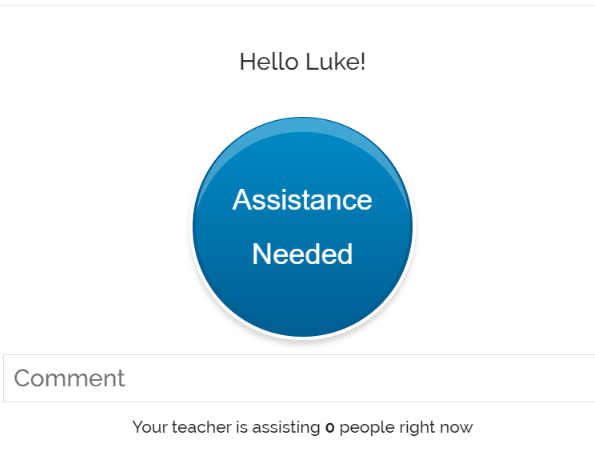
ClassroomQ was designed as a  virtual hand-raising tool that lets students ask questions and wait in a queue for their teacher’s assistance. But, I have not used it for this.

ClassroomQ has an online buzzer which can be used to play games or to turn a boring exercise into a game. However, the great thing about this tool is not its buzzer, it is its Box for Comments. This is where students can write whatever assignment you have given them. It allows a maximum of 200 characters/ about 35 words)

Imagine the possibilities: from very quick answers, like “what is the past of “take?” to more complex written assignments, like writing a small paragraph containing XXX

What gets students really engaged and motivated is the possibility to interact in real-time and the added challenge of being the first to answer correctly.

Instructions for the teacher
  • Go to https://classroomq/ and sign up.
  • You will be given a class code you will need to share with your students.
  • For more detailed instructions, watch these short video tutorials below
How have I used Classroom Q with my students?

Before the class: 

As we are revising Sports,  I created a hangman hiding vocabulary related to, obviously, sports. To get the chance to say a letter and guess the hidden word, I posed a question they needed to answer using ClassroomQ. I asked a mix of very short answers and some sentences to translate using the vocabulary in context. Classroom Q displays the answers of the first 5 fastest students. You can make room for another student to move up the queue by clicking on the name of one student and deleting them from the queue. They can also remove themselves from the queue by clicking their Cancel Button.

For more details, I have recorded these short video tutorials where I explain in detail how the tool works.

Part 1: The Teacher’s interface1:45)

Part 2: The student’s interface. (1:50)

Part 3: Viewing the students’ interactions (1:149

Don’t miss any posts! Follow me:

In Times of Crisis, Laughter is the Best Medicine

As we are confined in our homes trying to slow the spread of the coronavirus, we must try and make the most of this situation. Nobody could have predicted, back in September when we started the course, that talking about viruses and fear and panic and death was going to be one of our topics this course. Despite our growing concern for what lays ahead of us, I cannot and will not give my students a lesson that will cause them more pain and sadness. Yes. I want them to understand and use the vocabulary related to the situation we are living nowadays, but I also want to do my bit and help brighten up their day. I hope nobody takes offence.

We all know it’s bad out there but fear and worry over the coronavirus have prompted a crop of funny videos that I hope help me put a smile on your face. We need to be worried and we need to have a sense of common responsibility. That’s undeniable. But a little levity now and then is surely appreciated. I don’t need science to know that in times of crisis, laughter is the best medicine we have.

In this lesson, you will find

  • useful language to talk about the situation we are living now due to the coronavirus
  • a bit of listening practice
  • funny videos featuring situations or attitudes prompted by the pandemic
  • some conversation questions following the videos

Note: it goes without saying this speaking lesson will be done online.  I have shared this lesson with my students in advance and asked them to see the videos and have a look at the vocabulary.

The coronavirus

Is it advice or advise? Awesome Repository of Confusing Words in English

I always tell my students English is easy.  When they hear me say that, those who have been with me for two or three years just roll their eyes and say: “Teacher, you always say that!  For you, everything is easy!” But hey! What’s the point of saying ” Careful here!! This is very difficult!”

I am sure you see my point.


Anyway, the thing is that when learning a foreign language not everything is a breeze. Unfortunately.  There are hundreds of words that can be easily confused because they have a similar spelling or a related, but different, meaning.

Today, I want to share with you a website Writing Explained that is really helpful in clarifying differences or similarities in the meaning of hundreds of confusing words. For example, do you know when or how to use  Altogether and All together? Some day versus Someday? Elder and older?

Why do I like this site?

  • Though the list of confusing words is not exhaustive and new sets of words are added every day, it is just perfect for the average students.
  • The words are in alphabetical order so it is very easy to find what you are looking for
  • It is explained in clear everyday English
  • Differences are always explained in 5 steps and I love the Summary. This is the one I would read if I knew the difference and just wanted to double-check.
  • I also like the idioms dictionary on this website. Why?  Because it not only explains the meaning of the featured idiom but also gives its origin and uses the idiom in a clear context.

Check it out! You’ll love the site!

Note: Fromm my enthusiasm describing this website, you might think that this is a sponsored post.  It is not. 😉

The Secret List: A Non-Prep Vocabulary Revision Game to Kick Off the Lesson

I always start my classes revising what we learned in the previous lesson. I do it for many reasons: it allows students who have missed the previous lesson to catch up and not fall behind, it gives students the opportunity to clarify meanings or pronunciation they haven’t quite grasped, and also it encourages retrieval practice that, in my opinion, is the way to learn.

I really think that the first 5 minutes are really important as it sets the mood for the rest of the lesson. That’s why I  am always designing revision activities that add variety in my lessons and, if possible, fun.

This one I will call The List. It’s quick, fun and effective.

Context: I have been working with the topic Language Learning and my students have been learning some new vocabulary. Time to revise it!

Procedure: Ask your students to write a secret list of 10 words, collocations or expressions they learned during the previous lesson. Ask them to keep it secret.

Pair students up. Tell students they will have 1 minute to try to guess the words on their partner’s list. Say Student A starts trying to guess the words on Student B’s list. As B listens to the words, he crosses the ones Student A has guessed. Ask them to change roles. Let students compare lists and have a look at the ones they could not guess. You might want to write them on the board to revise and reinforce.

Award 1 point for each guess. Need a timer?  Here

Done! Easy peasy!


Learning Languages: my Fave Videos to Spark Discussion

Hello March!

Kicking off the month with one of my favourite topics of conversation: languages learning. This is a lesson I feel I could entirely teach based on videos from the internet and conversation questions.

I always like to introduce a new topic with some visual aid that either sparks discussion or puts a smile on my students’ faces. This time, I might have gone too far and used not one but four videos. Ohh, but they are so good!

These are the videos I have been using over the years and that have never failed me!

TO PUT A SMILE ON THEIR FACES

I normally play this video at the very beginning of the lesson and ask them to guess our next topic.  Believe it or not, although I have seen it a thousand times, I still laugh my head off.

Useful Vocabulary:

  • translator, interpreter, to translate from Spanish into English, native speaker,  to be fluent, to speak a language fluently, to be proficient in (English); to speak like a native speaker, to be bilingual, lingua franca.

Discussion Questions

  • How many languages do you speak?
  • What is the most difficult language to learn in your opinion?
  • Have you ever tried to learn a language and given up because it was very difficult?
  • Do you think that in the future there will be just one language in the world?
  • Nowadays English is the lingua franca; do you think this is going to change any time soon?
TO BOOST THEIR MOTIVATION

Before playing the video, ask students:

Why are you learning English?

Useful Vocabulary:

to do a course, have a chat, standard English, slang, take a message,  widely spoken, mother tongue, make mistakes, pronunciation issues, to make an effort, to sign up for a course, to learn a language online, a complete beginner.

Discussion Questions

  1. How old were you when you started learning English? Do you think it is a good age?
  2. What motivated you to start learning English?
  3. What are the advantages of learning a foreign language?
  4. Are there any similarities between English and Spanish? Does Spanish have many loan words from English?
  5. When you are speaking in English, do you try to be accurate or do you just talk and not worry about making mistakes? Which way do you think is better?
TO HELP THEM GET BETTER AT ENGLISH


Useful Vocabulary:  to switch between two languages, to put into practice, to feel frustrated,   a conversation partner, to memorize vocabulary, to improve your grammar, speaking skills, to have a good range of vocabulary.

Discussion Questions

  • Do you think it is possible for a non-native speaker to speak the language like a native?
  • What do you find most difficult to learn in English?  Why do you think is that?
  • What is the best way to speak a language?
  • What do you do on your own to improve your English?
  • What techniques do you use to learn new vocabulary?
TO SPARK DISCUSSION


Useful Vocabulary:

translator, interpreter,  context, translation fails, to come in handy, accurate translation,  basic conversation, translation app, a translation device.

Controversial Statements

On the board, write these two statements and ask students to choose the one they agree with.  Form two groups depending on their choice. Allow them to discuss their reasons to support the statement and then pair up students from different groups to try to convince each other to change sides.

The statements:

  • There is no point in learning a foreign language when Google Translator can do it for you”
  • “Translation technology is good but should not replace learning languages”

You,  as a teacher,  want to agree with the second statement. Here are some reasons against the use of translation apps and in support of the second statement  I have found to convince my students to keep on learning English. Do you think I’ll manage to convince them? Translation apps:

  • They cannot understand context or  translate pronouns correctly
  • Cultural references are lost
  • They don’t produce high-quality translations
  • Accuracy depends on your accent  or on background noise
  • You cannot use it for long  and involved conversations
  • It is not good at recognising proper names and names of cities
  • Your data is not safe