Tag Archives: onlinetools

Spinning the Wheel: an Engaging and Productive Speaking Activity.

This is a very simple communicative activity that works wonders because it is highly engaging, students love it and it is very productive. It takes 2 minutes to create and it is adaptable to any topic of discussion and suitable for all levels.

 

Aim: activating new vocabulary through discussion questions.

Levels: all

PROCEDURE.

  1. Easy peasy! Just go to wheeldecide.com and fill in one wheel with the target vocabulary and another one with the questions you want your students to discuss.
  2. Students in pairs
  3. Spin the wheel containing the questions and then, the wheel containing the word/ expression you want your students to use when answering the question.
  4. Student A has 2 minutes to talk about the question and use the target vocabulary. If he does, he scores a point.
  5. Spin the wheels again. It’s student B’s turn.

NOTE: When creating the wheel, go to the advanced section to choose colour and whether you want the option to be removed after it is landed on or not.


If you are a student and you’re preparing for exams or studying on your own, you probably have your own studying strategies, but I invite you to try this new one. I’m sure you’ll find it engaging and productive.

I ‘d like to thank Cristina Serafim for bringing wheeldecide to my attention.

Blog de Cristina is also on Facebook. Follow us!

 

Rewordify: a Free Online Tool to Simplify Difficult English

Today I want to share with you an amazing free online tool which has a lot of potential for learning English.

Rewordify simplifies difficult English and helps you understand what you read.

How this tool works

  • Go to Rewordify.com
  • Enter sentences or whole paragraphs difficult to understand into the yellow box at the top of the page. You can also enter a web site URL.
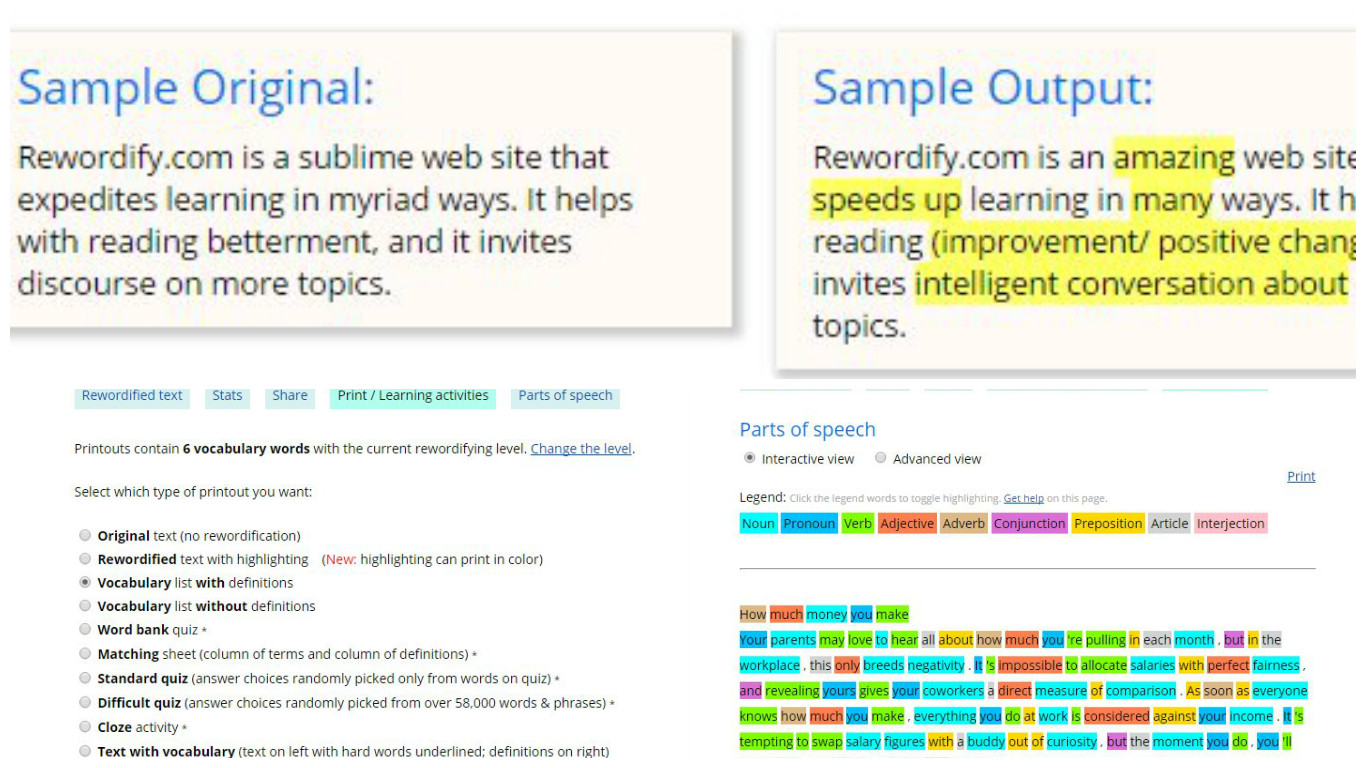
  • Click Rewordify text and you’ll instantly see an easier version of the text providing clear, easy-to-understand definitions. (see picture below)
  • The reworded words are highlighted in yellow— click them to hear and learn the original harder word.
  • You can also click the non-highlighted words to read their definition.
  • Click the Print button and choose the type of printout you want. You can print the original text, the rewordified one, vocabulary lists with definitions and without them, a word bank quiz, a standard quiz or a difficult one… etc (see picture below)
  • By clicking the Parts of Speech button you’ll see nine part of speech categories (see picture below).You can turn on and turn off the highlighting of each part of speech by the words in the header. For example, if you only want the nouns and verbs highlighted, click all other parts of speech in the header

You don’t even have to register but if you free register:

  1. You can change how the highlighting works to match the way you learn
  2. Store, edit and delete your documents
  3. Share your documents
  4. Save vocabulary lists

Up for a little game?

And if after working hard on vocabulary you still feel up for a little challenge, Rewordify has created two word games for you

  • Reword where you’ll have to select the correct definition for the hardest words in English, as fast as you can.
  • Difficult Hangman. An old favourite but with hard words.

Thanks for reading!

10 Creative Ways to Use the Wheel of Fortune to Teach English

The wheel of fortune? I know. I know. If I want you to continue reading, I’d better explain what it is. Have you ever seen the game show Wheel of Fortune? Yes, that one where you spin a wheel and get money if you successfully guess the missing letters in a word or phrase.

Good news. It can also be used to teach/learn English.

Unfortunately I am not working with primary or secondary students. I know they would love this tool. It’s a lot of fun to work with -spinning a wheel normally is, isn’t it?-, but it also has a lot of potential to teach/learn English. I teach adults and it normally takes them more time to get used to the way I teach. Sometimes, a far cry from traditional. Well, yes, I take my work very seriously but, from time to time, I like to spice up my lessons with little games and online tools to energize my lessons. This tool I’m using today is from classtools.net.

In this post, you’ll learn

  1. How to feed the wheel
  2. Ideas to use the wheel of fortune to teach/learn English


1. How to feed the wheel

  • Click here to get to the wheel
  • Click on Edit and write whatever you want to see displayed on the wheel.
  • Click on Save this list as currently shown
  • Choose a password to edit the wheel in the future
  • Make sure you make a note of the unique address of your wheel. I suggest you email yourself the link.
  • After a name or category is selected you can remove it from the wheel.

2. Ideas to use the wheel of fortune to teach/learn English

Vocabulary

  • Revising vocabulary. Very useful to revise vocabulary either as a whole class, in pairs or in competitions. Students will need to either explain the meaning of a word or use it in context. Nobody will ever accuse you of favouring a team and there are countless options when working with vocabulary. While you’re reading this article, I am sure your brain is already suggesting lots of possibilities, like irregular verbs, phrasal verbs, phonemic transcription…etc
  • Another possibility to explore would be feeding the wheel with different topics and asking students to write or say as many words related to the topic as possible in one minute. Some easy topics could be: jobs, shops, nationalities, animals, food…etc.

Speaking

  • Three minutes. Feed the wheel with different topics you want students to talk about and ask students to work in pairs and spin the wheel. They’ll have to talk about the topic for about three minutes. Great to revise for oral exams!
  • Hot seat.  Again feed the wheel with different topics you want students to talk about and divide the class into teams and ask a student from Team A to sit in the “hot seat”. Spin the wheel. Members of the other  team need to ask him questions about the selected topic; he’ll need to talk for about three minutes answering the other team’s questions but his answers cannot contain the words YES or NO.
  • Comparing. Do you want students to compare? Feed the wheel accordingly: compare living in the countryside/city, travelling  by bus/plane, working as a teacher/shop assistant…etc

Writing

  • Storytelling. Give students an inspiring story starter and feed the wheel with prompts they need to incorporate in their story. Spin the wheel and give students a minute to use the prompts in their stories. Spin the wheel as many times as you deem appropriate. Display on the walls of the class the stories for everybody to read.
  • Using connectors. Feed the wheel with different connectors (and, but  however, although,…etc). Ask students to work in pairs. On the board, write three sentences and ask students to choose one. Tell them this sentence will be the first in their stories. Spin the wheel and display the first connector they need to use.  Spin the wheel as many times as you deem appropriate. Display on the walls of the class the stories for everybody to read.
  • Dependent prepositions: feed the wheel with verbs such as depend, rely, insist…etc and ask students to write a sentence using the verb together with its dependent preposition.
  • Order of adjectives. Are you teaching the order of adjectives before the noun? Feed the wheel with nouns and ask the students to write a sentence containing the noun modified by two or three adjectives.
  • Verbs followed by infinitive/gerund. Are you teaching/learning verbs followed by infinitive or gerund? Rotate  the wheel and ask students to write a short sentence containing the verb randomly chosen.

I’m sure you have some more ideas to use this classroom tool, which is free and embeddable.  Have fun while learning, have fun while teaching.  😉

Blog de Cristina is also on facebook. Follow us!

The 8 Best Audio/Video News and Current Affairs Websites to Learn English.

I’m currently really tied up with checking exams, so I’m going to make the introduction to this blog post really brief.  I’m sure you have enough on your plate, too. June is usually a hectic month for almost everybody, isn’t it?

So, how do you keep up with the latest news? Or maybe, are you one of those who, sick and tired of reading bad news, have decided to completely isolate yourself from the world? I wouldn’t blame you!

If you are one of those, I kindly suggest you make an exception for the sake of learning and improving your English. You won’t regret it! Reading is one of the best ways of acquiring vocabulary and learning grammar without studying.If you read and listen to one article every day, or two if you feel overzealous, your reading and listening skills will improve very quickly. Trust me on this!

This is my selection of the best audio/video news and current affairs websites to learn English.

I have looked at the following features in all the websites:

  • If the news is written in levels
  • If the same news is written/read at different levels
  • If it is audio news or video news
  • If the transcript is provided
  • If the site provides a ready-to-use lesson plan for the news
  • Any other relevant additional content

The image below is interactive. Click on the icon and read what each website has to offer.

How else can I use these sites in the classroom?
• Choose one news website from above and ask students, as homework, to read a piece of news they find interesting. Ask them to read the news several times until they feel confident they can retell it. In the next class, ask students to work in threes and share their news.

• The news. Same procedure as above but this time, at home, students will need to rewrite the piece of news in their own words. In class, and again working in threes, students will be asked to assume the role of newsreaders and present the news to the rest of the class.

The interactive image has been created with Genial.ly,a free online tool for creating visual interactive content.

Tips and Links to Prepare for the Oral Exam at Home

I love trying new tools and today I’m trying Wideo, which is a tool which lets you create beautiful animated video content in a very easy way. Although I’ll write about some of  its pros and cons below, the reason why I’ve chosen Wideo today is because I needed a tool that allowed me to insert interactive buttons in an easy way and Wideo is perfect for this.

So, here’s the video: Tips and Links to Prepare for the Oral Exam at Home

Play the video. It will stop where interactive buttons are provided (last two slides). Click to resume the video.

What I like about this tool:

  • it’s free, easy to use and very intuitive.
  • It provides free video hosting
  • Lots of professionally-designed templates to choose from
  • You can upload your own picture, music and background images
  • You can add interactive elements (clickable buttons and contact forms)
  • It provided a unique url and an embed code
  • You can switch from video mode to presentation mode for slide-by-slide presentation.

 What I don’t like:
    • Time limit: on a free plan, the length of the videos is restricted to 3o seconds.
    • You have to pay to download your video

Blog de Cristina is also on Facebook. Follow us!